


Subscribe & Save With Chubby Mealworms
Set up a regular delivery, save 5% on every order, and change or cancel it whenever you like. Here’s how it all works.

If you have a reoccurring subscription with us, you are not eligible to earn or redeem points on your account.
Chubby Subscription Guide
We have made it possible for you to easily setup regular subscription orders so you can relax and know that you won’t run out of Chubby Dried Mealworms or our other products again! What makes it even better is that our subscription prices are discounted so our regular customers save money.
We know that our customers also want flexibility and don’t want to be tied into any contracts which is why you can change and amend every aspect of your subscription at any time or cancel it in full. All details and questions are answered below.
How It Works
Add It at the Checkout
Choose Subscribe & Save on any product page
Manage Your Deliveries
Reschedule or skip an order from your account
Cancel Any Time
No contracts — pause or cancel whenever
About Our Subscriptions
We have designed Chubby Subscriptions to be completely flexible so that you are always happy and comfortable with the service. You can skip deliveries, update your delivery address, cancel your order, or perform a multitude of other actions with your subscription at any time. This guide aims to easily show you how to manage your subscription. The majority of these functions can be performed in the Manage Subscriptions section of our website.
Save 5%
Subscription prices are discounted on every delivery.
No contracts
Change, skip, pause or cancel at any time.
Free shipping
Free shipping Australia-wide, GST included.
Creating Your Subscription
Most of our products are available to purchase on a subscription. To do this all you need to do is visit a product’s detail page — this is the page where the large product description can be seen.
From here you have the option of purchasing one-time only which is the default option, or Subscribe and Save. If you wish to subscribe just select this option and then choose how often you want your Chubby Mealworms to be delivered. Don’t worry about this too much — you can always easily change it later if you find you are getting too many delivered or need more at certain times of the year.
When you have made your selection click ‘Add to Cart’.
If you already have an account with us, you cannot log in and use it to prefill this information at this stage, but your orders will show in your account after completing it.
Managing Your Subscription
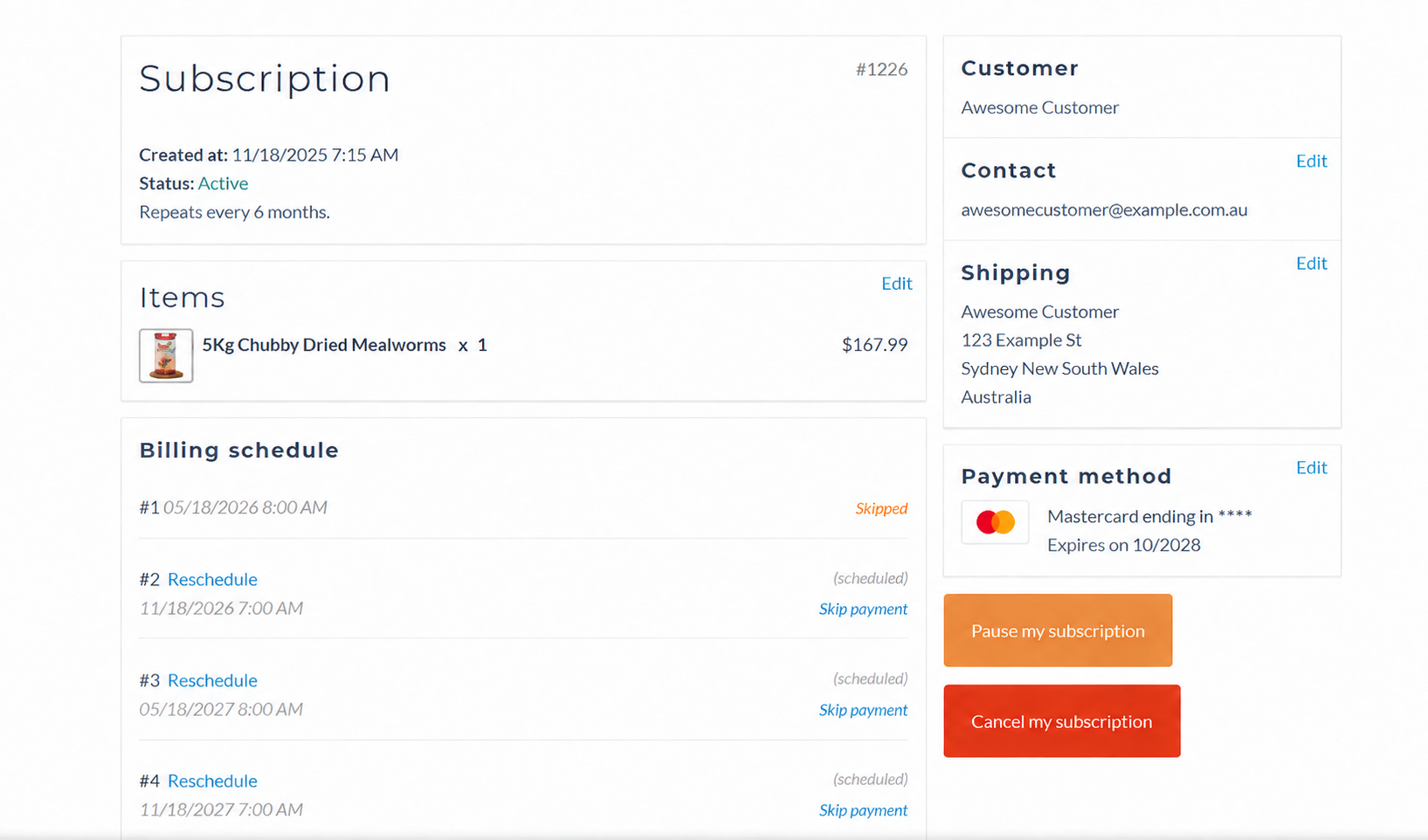
If you want to get to the Manage Subscription page, the easiest way to do so is by clicking the link in the emails we send with your orders. The second way is by logging into your account page, which you can access by clicking the Login / Register link at the top of the website, then clicking Manage Subscription.
Inside the subscription portal you can:
- Pause a subscription at any time
- Reschedule a delivery
- Skip an order — you won’t be charged
- Cancel your subscription — we’ll email you to confirm
- Edit your contact, shipping and payment details
Hover over the Chubby pins to see what each control does.
Updating Your Card Details
If your credit or debit card information is ever altered, you will need to update it or your orders won’t be dispatched. Card and billing details are only updated in the subscription customer portal, which you reach from your Manage Subscription page. In there, click ‘Edit’ next to Payment Method.
Still have a question?
We’re a small team and read every message ourselves.